
 TrafficTriage
Connect Search Console to Your AI Assistant: 4 Ways
Four ways to get Google Search Console data into Claude, ChatGPT or Cursor: managed MCP, open-source MCP, the API, or a CSV export. Which to pick, and why.
Google Search Console is the only record of how Google actually treats your site, and for most people it is a tab they never open. Getting it into Claude, Cursor, or ChatGPT is a solved problem - there are four ways to do it, and they differ in setup cost, not in the data they reach.
What you get, and how the four routes differ
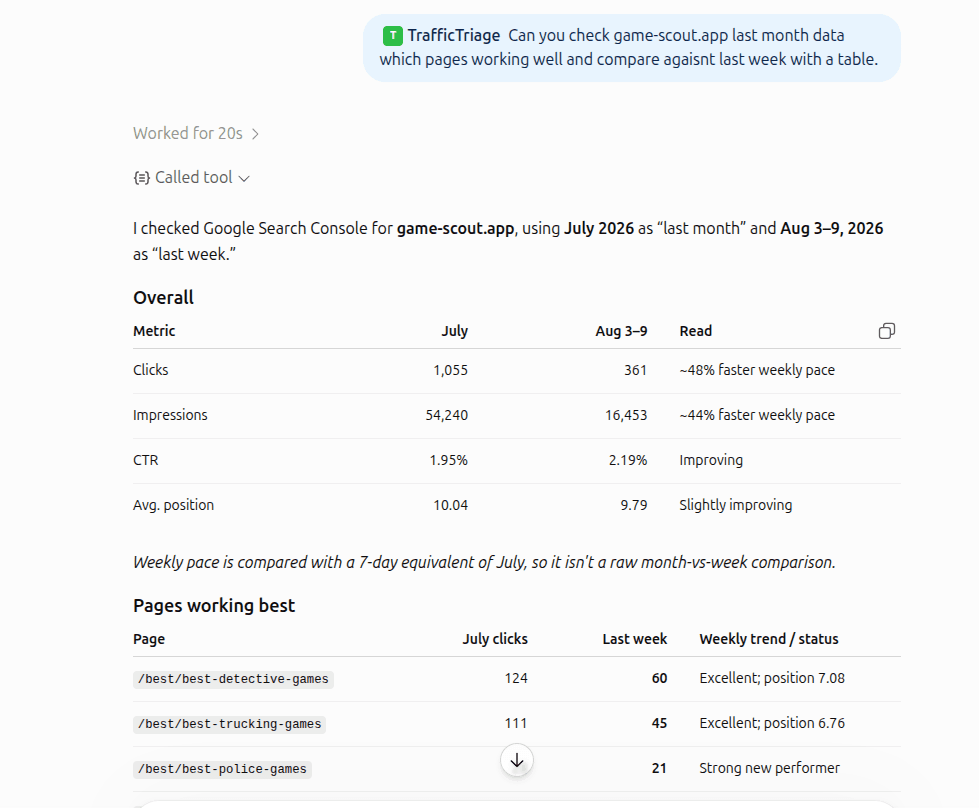
Which route you want depends on how often you plan to ask. If you want an answer rather than a project, take the managed MCP server. If you want raw rows inside a script, take the API. If you have exactly one question and never want to configure anything, export a CSV - and accept that it is the only one of the four you cannot repeat without doing the whole thing again by hand.
Search Console is Google's own record of your site in search: which queries showed your pages, how often people clicked, and roughly where you ranked. That data is the half your assistant cannot get by crawling you from the outside: a crawl tells you whether Google can read your site, Search Console tells you what Google actually did with it.
What changes when the data is in the chat is the follow-up. A dashboard can tell you a page was shown 400 times and clicked 3 times, and then it stops. An assistant that can also see your repository can be asked rewrite the title and description for that page in the next message. The tools side of that is covered in running SEO checks in Claude and Cursor.
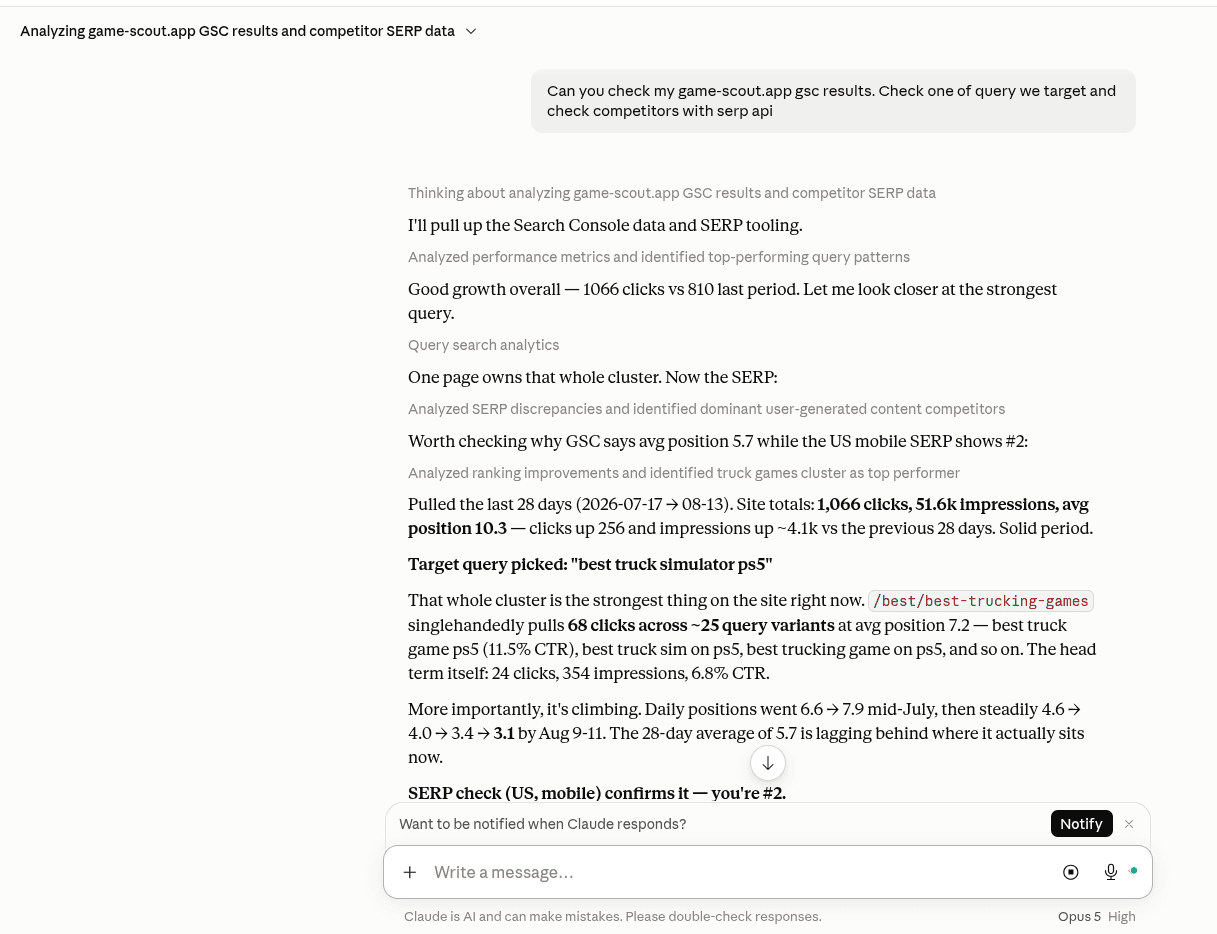
What “the one query you are closest to winning” cashes out to in practice is the whole subject of how game-scout got its first clicks from Google: one specific, thin-competition query beat every broad term it tried, and the same read is sitting in your own Search Console data right now - an assistant connected to it can just tell you.
The four routes, side by side
Each route below carries the same three facts: who it suits, what it costs to set up, and whether you can repeat it without touching Search Console again. That last one usually decides it.
- Managed MCP server - suits someone who wants an answer, not a setup. Setup cost: a free account, no Google Cloud project. Repeatable from the assistant: yes.
- Open-source MCP server - suits someone comfortable in a terminal. Setup cost: a local install and your own OAuth credentials. Repeatable from the assistant: yes.
- Search Console API - suits scripts and scheduled jobs. Setup cost: a Google Cloud project and a JSON key. Repeatable without a human present: yes.
- CSV export - suits one question, right now. Setup cost: none. Repeatable: no, you redo the export by hand every time.
The two MCP routes and the API all end up calling the same Search Console API with the same read-only scope. What you are really choosing is who runs the OAuth flow and where the credentials live: on someone else's server, on your laptop, or in your own deployment environment.
Route 1: the managed MCP server
This is the route with no Google Cloud project in it. You add one URL - https://traffictriage.com/mcp - to Claude, Cursor, ChatGPT, or any other client that accepts a remote MCP server, create a free TrafficTriage account when it asks you to sign in, and then approve read-only Search Console access once from your dashboard. The scope requested is webmasters.readonly, and you can revoke it from your Google account's security settings whenever you like.
The per-client steps differ more than you would expect. Claude wants a name and a URL. ChatGPT wants Developer mode switched on first, in a settings section most people never open, and it is the only client of the three that fails outright if your server does not advertise the openid scope. The ChatGPT setup, step by step walks that one through, including the scope failure and how to check for it.
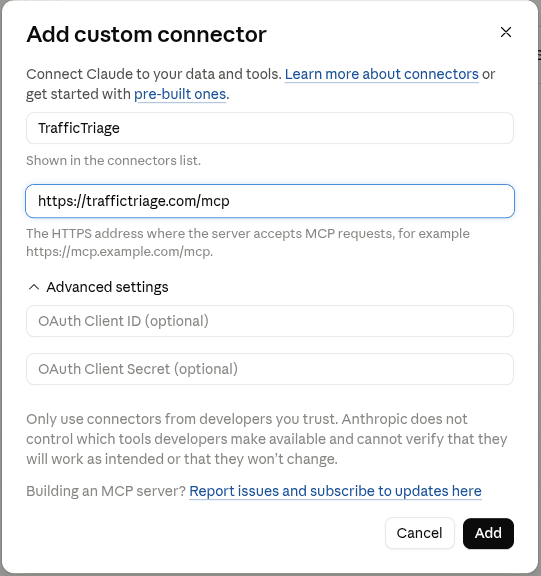
The thing that trips people up is that signing in with Google is not the same as granting Search Console access. They are two separate consent screens. If you created your account with Google but never saw a read-only Search Console prompt, the connection is not made yet.
Once it is connected, run_gsc_report runs 6 checks over 90 days of your data and ends in one verdict rather than handing you a table to interpret, and query_search_analytics is there for when you want to ask something the 6 checks do not cover. Reports created over the server are private to your account. The step-by-step, including what each of the 6 checks answers, is in connecting Search Console to Claude with the MCP server, and the full tool list is on the MCP server page.
The trade-off is honest: you are trusting a third party with a read-only grant, and the free account is metered - a monthly allowance on each tool, with the Search Console tools not counted against any of them. If you would rather no one else hold the grant, take route 2 or 3.
Route 2: the open-source GSC MCP server
If you want an MCP server but want to hold your own credentials, AminForou/mcp-gsc is the open-source option. It is MIT-licensed and you run it yourself, and its README documents two ways to authenticate: OAuth using your own Google account, or a service account for automation and team use. It lists Claude Desktop, Cursor, Codex CLI, Gemini CLI, Antigravity, and any other MCP-compatible client.
The cost is setup and maintenance. You create the Cloud project, keep a credentials file on disk, and the server only exists while your machine is running it. It also hands your assistant the raw numbers and leaves the interpreting to you, which is the right shape if you already know what you are looking for and the wrong shape if your actual question is “is anything wrong.” How it compares to the other servers an indie developer might add is in our rundown of the servers worth adding at zero.
Route 3: the Search Console API with a service account
Pick this when the consumer is a script or a scheduled job rather than a person in a chat window. A service account is a Google account that belongs to your code instead of to you, so nothing has to open a browser at 3am. You create a Google Cloud project, enable the Search Console API, download the service account's JSON key, and then - the step people miss - grant that service account's own email address permission on the property from Search Console's users and permissions screen. Google's prerequisites are explicit that “your account must have the appropriate Search Console permission on a given property in order to call that method on that property,” and the service account is a different account from yours.
The request itself is one POST. As of August 2026 the Search Analytics query reference documents the endpoint and the request body as:
POST https://www.googleapis.com/webmasters/v3/sites/{siteUrl}/searchAnalytics/query

{
  "startDate": "2026-05-15",
  "endDate":   "2026-08-13",
  "dimensions": ["query", "page"],
  "rowLimit":   1000
}
Authentication is not on that page. You send an OAuth access token, minted from the service-account key, in an Authorization: Bearer header - which is the step a Google auth library exists to do for you.
startDate and endDate are required and use YYYY-MM-DD. rowLimit accepts 1 to 25,000 and defaults to 1,000, so a query with more rows than that silently gives you the top slice unless you raise it. siteUrl is the property exactly as Search Console spells it - https://example.com/ for a URL-prefix property or sc-domain:example.com for a domain property. Request the webmasters.readonly scope unless you have a specific reason to want write access.
Note what this route is not: it is not an assistant integration by itself. It gets you rows. Your assistant reads them only once something puts those rows in front of it - a file you paste, a database it can query, or an MCP server you write around this call, which is how routes 1 and 2 came to exist.
Route 4: a CSV export, with no setup at all
For a single question, this is still the fastest answer, and it is the one nobody writing about MCP wants to admit. Open Search Console, pick your property, open the Performance report, set the date filter to the last 3 months, and use the Export button to download a CSV. You get a small .zip, and you can drop it straight into a chat.
The catch is the one the four-routes list above already names: it is not repeatable. Every time you want current numbers you redo the whole thing by hand, which is fine monthly and unbearable weekly. If you want the same 6 checks the MCP server runs but without connecting anything, our browser-based Search Console report takes that export and analyses it in your browser - the file is never uploaded.
Which one to pick
- You want an answer, not a setup - the managed MCP server. One URL, one read-only consent, no Cloud project, and the output is a verdict rather than a table.
- You do not want a third party holding the grant - the open-source server. Same tools in your assistant, your credentials on your disk, your Cloud project to maintain.
- The consumer is a cron job, not a person - the API with a service account. Nothing to authorise interactively, and the output goes wherever you send it.
- You have one question and will not have another for a month - export the CSV. Setting up a server for a question you ask twice a year is the more expensive mistake.
- You have no Search Console data worth reading yet - none of the four. A site Google has barely crawled has nothing to report, and the useful check is whether Google can read the site at all.
FAQ
Is it safe to give an AI assistant my Search Console data?
It is read-only if you keep it read-only. The scope to grant is webmasters.readonly, which lets whatever you connected read your search data and nothing else - it cannot change your site, your Search Console settings, or your Google account. With the TrafficTriage MCP server that is the only scope requested, and you can revoke it any time from your Google account's security settings. On the self-hosted and API routes you choose the scope yourself, so ask for the read-only one; a key file with write access sitting on your laptop is the risk, not the assistant.
Do I need a Google Cloud project?
Only for two of the four routes. The open-source MCP server and the Search Console API both need you to create a Google Cloud project, enable the Search Console API, and download a credentials file. The managed MCP server does not - you approve read-only access once from your dashboard. A CSV export needs nothing at all.
Can ChatGPT read Search Console, or only Claude?
ChatGPT works. I connected the TrafficTriage MCP server to ChatGPT myself and it reads Search Console data the same way Claude and Cursor do. What you need is a client that can add a remote MCP server by URL, a TrafficTriage account, and Search Console connected to that account - the server is the same URL for every client. The current per-client setup steps live on the /mcp-server page, because each vendor moves its connector settings around.
What can I actually ask once it's connected?
Plain-English questions, not tool names. Ask run a Search Console report for example.com and the TrafficTriage server runs 6 checks on 90 days of your real data: whether your visibility is growing, the one query you are closest to winning, pages Google shows people who then don't click, how much of your traffic is just people typing your name, queries stuck on page 3, and whether your clicks are split across two versions of your site. The value is the follow-up question - because the assistant can also see your code, fix the title on that page is the next message rather than a separate task.
Not sure there is anything in Search Console to read yet?
Paste a URL and the 8 indexing checks run from the outside - soft-404s, sitemap, robots, canonicals, one site version, page basics, machine readability, index signals - scored Critical, Monitor, or Healthy, with one verdict on screen. No account, no Search Console, no connection of any kind.
Every guide in this cluster
- Run SEO Checks in Claude and Cursor With an MCP Server
Add the TrafficTriage MCP server to Claude or Cursor and ask your assistant why your site isn't on Google: the 8 checks and one verdict, in chat.
- Connect Search Console to Claude With an MCP Server
The managed route, step by step: connect Google Search Console to Claude or Cursor with the TrafficTriage MCP server - 6 checks, read-only, in chat.
- SEO MCP Server for ChatGPT: the Free Setup, Step by Step
Connect an SEO MCP server to ChatGPT on the free plan: Developer mode, the New Plugin form, and the OAuth scope that breaks it when Claude works fine.
- Google Stopped Indexing My New Pages: What Actually Fixed It
18 new lists, 17 stuck at Discovered - currently not indexed. Request Indexing did nothing; the link graph did. Every date, and the part I cannot prove.
- How I Found and Fixed Orphan Pages With an AI Assistant
Nine orphan lists, a link score that graded the wrong thing, and clicks up 1,055 to 2,147 in a month - the honest split of proven vs. too new to tell.
- How I Run My Site's SEO From an AI Assistant Each Morning
A real morning on a 67,000-impression site: the 7am Search Console report, the page that ranks and earns nothing, and how I pick what to write next.
- SEO MCP Servers for Indie Hackers: Which One to Use
Most SEO MCP servers are built for agencies with data plans. Here's which ones fit an indie hacker at zero, and the one job each of them does best.
- IndexNow Said 200. Two-Thirds of My Pages Were Never Sent
74 green IndexNow runs, HTTP 200 each, and 105 of 161 sitemap URLs never announced to Bing. How the gap hid, the audit that found it, the one-call fix.
- Do Supporting Articles Help SEO? What 34 of Ours Earned
One site, one month: 45 auto-built lists earned 406 Google clicks, 34 articles earned 21. What supporting articles actually do, and how to check yours.
- Indexed Pages Dropped in Search Console: What We Lost
Our Search Console indexed count fell from 560 to 524. How we diffed impressions and inspected 436 URLs to name the losses, and why none needed a fix.
- Search Console API: No Way to List All Indexed Pages
There is no bulk index-status API. URL Inspection takes one URL per call, 2,000 a day. What works instead, and the hourly sweep we built around it.
- Crawled Currently Not Indexed but the Page Is Indexed
Search Console said crawled, currently not indexed on a page earning 4,993 impressions. It was wrong. How to tell a false verdict from a real eviction.
- Updated a Page and Impressions Dropped: Two Real Outcomes
We edited two pages on the same day. One went quiet for nine days and came back stronger; one never recovered. Search Console daily data tells them apart.
- Are Listicles Good for SEO? We Measured 2,000 Queries
We split 2,000 of one site's queries by what the answer demands. List-shaped queries clicked at 3.41%, yes/no questions at 0.13% at the same rank.
- Are Comparison Articles Good for SEO? 25 Pages, 15 Clicks
Our 25 'X vs Y' pages earned 4,732 impressions and 15 clicks in 90 days. Forums own comparison results; here is the two-minute SERP check to run first.
- Do Internal Links Help SEO? Ten Links That Did Nothing
One page, ten internal links, and one click between all ten linking pages. Why links from pages Google never serves pass nothing, and how to audit yours.
- Is Average Position in Search Console Accurate? Partly
Average position is computed correctly and still misleads: 74 to 94% of our pages' impressions sat on unnamed tail queries. Run this split before any fix.
- How to Prioritize SEO Tasks: One Graded Bet at a Time
Seven weeks of one-bet-per-cycle prioritization on a real site: numeric targets, HIT or MISS grades, and the diagnosis our own next grade disproved.
- Do Hub Pages Help SEO? Six Hubs, One Click in 29 Days
We built six hub pages, logged a prediction, and graded it. The hubs ranked at position 5 to 9.5 and returned 1 click. What the links did instead.
- Is Website Change Monitoring Worth It for SEO? 165 Pages
I tracked 165 pages on my own site for 21 days. One nav edit flagged 161 of them for two words. One alert was a page that lost 85% of its text.
- How to Cluster Search Console Queries: I Tested 5 Ways
I scored grouping by ranking page against four LLM runs on three sites. The free method hit f1 93.1% where gpt-4o managed 89.4% for five cents.
- Are Automatic Internal Links Good for SEO? 22 Never Render
We configured 214 related links on game-scout.app and 22 never reached a page. What generated internal links actually render, and what moves when they do.
- Do Pages With No Traffic Hurt SEO? 9,864 Pages Measured
On game-scout.app, 107 curated lists earned 5,466 clicks in 90 days while 9,864 indexable catalogue pages earned 17. What that actually cost.
- Is Keyword Search Volume Accurate? We Checked Against Ours
One tool returned 32,987 monthly for a head term and two long-tails, and 0 for the phrase our own Search Console measures most. What we use instead.
- GA4 vs Search Console Clicks: We Found the Missing 40%
Search Console counted 2,619 clicks on game-scout.app in 28 days; GA4 logged 1,565 organic sessions. We split both by country and found the border.
- Pages Lost Rankings But Nothing Changed: What Split Them
Score, internal links, health checks and last-edit date all failed to separate 25 falling game-scout pages from the risers. One query pull did it.
- Search Console Queries Don't Add Up: 9.5% Was Visible
Grouped by query, our 90-day Search Console rows held 9.5% of impressions and none of the 12 clicks. Grouped by page, the same window gave 102.9%.
- Does Adding 'Best' to a Title Help SEO? 10 Pages Measured
On 10 game-scout list pages, 'best' queries sat at position 6.9 with 4.0% CTR; bare queries at 9.5 with 1.7%. Four live SERP pairs show what causes it.
- Ranking on the First Page but No Traffic: Three Ceilings
Six guides at positions 4 to 6.6 drew 105 impressions in 28 days; a sibling at 6.6 drew 1,637. The impressions column names the ceiling, not position.
- Impressions Dropped, Position Improved: One Was Real
Our 28-day compare read impressions down 46%, position up 16 places. The daily series held two events: a harmless tail loss, then a real collapse.
- SEO Tool Shows Fewer Pages Than Your Sitemap? Check This
My own page monitor listed 165 pages while the sitemap held 231. Its sitemap reader had failed every hour for 33 days and never logged an error.
- Traffic Dropped on Mobile but Not Desktop? Split It by Page
Our device tab said mobile lost 651 clicks and desktop 40. Split by page, four of the five biggest losers lost impressions on both devices, not one.
- Bing Webmaster vs Search Console: Why the Numbers Differ
Bing reported a better position than Google on all 28 pages both engines showed us, but its page report stops at position 10. How to compare them fairly.
- Does Changing Title Tags Improve Rankings? 6 Pages
I retitled 6 pages on my own site and read the result on the date I logged. CTR moved, rankings did not, and 82 untouched pages grew faster.
- How to Tell If SEO Changes Worked: 6 Predictions Graded
We logged six SEO predictions with a number and a date before each change. Four came due: one hit by nine times, two missed, one cannot be credited.
- Organic Traffic Still Dropping? One Page, Not the Site
I asked my assistant whether to wait or fix a 3% drop. One page had lost 177 clicks while every other page grew 13%. The answer split the same way.
- Is It Normal for Google Rankings to Fluctuate? Three Tests
One page moved three times in one summer. A dated retitle explained the climb, the site explained the surge, only the live results page explained the fall.
- How Long Does Google Take to Index a New Page? 81 Timed
I timed 81 new pages on two of my sites. 35 of 40 were fetched within twelve hours on one. On the other, 28 of 29 were never fetched in up to 40 days.
- Removed Noindex but Page Still Not Indexed? Read This Date
The noindex came off one of my pages on 2026-09-29. Two weeks later Google still said Excluded by noindex tag, from a single crawl on 2026-09-11.
- Search Console Impressions vs Page Views: Why They Differ
145,660 impressions against 6,581 page views in 28 days, and 63% of the pages people viewed had no impressions. How to compare the two numbers by page.
- Does Schema Markup Improve Rankings? A 14-Page Test
We added BlogPosting schema to 14 list pages. Only one was a clean test, and the verdict flipped with the control group. How to test schema on your site.
- Organic Traffic Flat Despite Publishing? Split It by Page
Our flat fortnight read 1,188 to 1,255 clicks. By page it was 203 lost and 270 gained, and 44 new pages added 1.3 clicks a page a week. How to split yours.
- AI Mode Follow-Up Queries in Search Console, Measured
Search Console logs AI Mode replies like more and yes as queries. On our site they were 14% of query rows, a third not in English. How to find them.
- Do Ads Affect Core Web Vitals? What Our Field Data Showed
Two ad scripts moved our field LCP, INP and CLS, while Lighthouse saw neither and our own tool showed site data as page data. How to read yours after ads.